



Even while writing this blog, I caught myself thinking, should I just use AI to put my thoughts into words? I don’t have to sit and write everything myself.
We are now using AI for almost any task that takes up our time. Even this blog, if someone feels lazy to read it, they can just summarize it and get the key points in seconds. That’s how much AI is influencing us.
But there’s also a dilemma, how much should I actually use it? If I rely on it too much, will it make me lazy? Will it affect how I think?
Personally, I see AI as a tool, something that can help me do things faster. So I tried something simple: I replaced 5 of my daily tasks with AI.
The 5 Tasks I Tried to Replace
1. Writing Emails
Oh boy, this is a very tedious task. Writing an email is not as easy as it sounds. We need to control our emotions and carefully frame the right context to convey our message.
In a day, we are bombarded with so many emails. And most of us now have at least one personal and one professional email account to control.
The Struggle
There have been times when a response from someone just gets to you. I believe all of us have come across such emails at some point in time.
Earlier, I used to sit and carefully write every email, making sure I sounded professional. I would double check every sentence to ensure I wasn’t going overboard with my responses.
I’ve also faced situations where I had to send the draft to my manager before sending it out. They would review it to check if it was professional enough, to send to the client. And sometimes, even after that, managers would still ask to review responses again just to be sure.
Using AI
The biggest help I get from AI is that I can put all my emotions into the chat without any filter and ask it to make it polite, professional, or humble.
With just one prompt, it fixes everything. This has been one of the best uses of AI for me so far. Even management teams are now asking employees to use AI to make their replies more professional.
AI is not only helping at work, but also in personal life. I had a situation where I had to explain the full story to get a refund for a product, and it was a bit complicated. So I shared everything with AI, and it drafted a clear email with all the details. That genuinely made things much easier for me.
Now things are getting even more interesting. Email tools are integrated with AI in the back-end. Once we receive an email, it already suggests replies. With one click, the reply is ready, we just have to tweak it and send. This has made things much easier.
2. Researching Topics
I still remember my days in college, where I had to explore the vastness of the internet just to get one simple context for a research paper. Using the right keywords, learning Google tricks, digging deeper to find the right content, it was a process. Honestly, it felt like exploring the unknown.
The Struggle
Finding what we needed was a challenge. Since Google was the main search engine, we had to scroll through multiple pages, posts, and articles just to find what we were actually looking for.
I used to learn new tips and tricks to search better. But even with all that, the time it took to find the right information and create a report was just too much.
That ability to search better did help me land a job. But over time, the amount of research only kept increasing as the available knowledge kept expanding every day, new tools, new solutions, new ideas.
Search engines mostly showed content that was optimized or had better keywords. We still had to go through multiple pages to find what we actually needed.
And sometimes, the blog title would say something completely different from what was inside. It made research frustrating.
Using AI
AI hasn’t completely taken over research, but it has made the process much easier for us. I’m able to find information faster, in a more structured way, and in the format we want.
I can have a conversation with AI to dig deeper and get more specific details. If I need more information, I can simply ask again and refine the results. We can even create different AI chats for different types of research. You can guide AI to act like an expert in a particular niche and use that to explore topics more deeply.
I wouldn’t say research can fully depend on AI yet. But compared to before, it now saves hours of time.
3. Brainstorming Ideas
Getting ideas is not easy. We have to keep our inspiration hats on all the time. Always keep your eye on the surroundings, because you never know, where the next big idea would pop up from.
The Struggle
In my first job, we used to have separate brainstorming sessions just to come up with blog titles. Every week, we would sit together to list out topics for upcoming articles. Finding the right title based on keywords and search engine metrics was a task on its own.
One thing I always felt was that idea generation was limited to the participants’ knowledge. Even though we collected suggestions from others, the creativity was still restricted to those 5–10 people in the room. Without fresh external input, it started to feel repetitive at times.
As a junior, I was also hesitant to speak up. I used to wonder, is my idea good enough? Is it impactful enough to share?
Using AI
Now, with just one prompt, I can generate hundreds of ideas. The first time I tried it, I was genuinely surprised at how easy it made things.
It becomes even more useful when you want to go deeper into a specific niche. You can explore different angles, analogies, and trends much faster.
Yes, not every idea is accurate or useful. But with the right prompts, you can narrow it down to exactly what you need. That’s what makes it one of the most useful tools for brainstorming today.
4. Summarizing Content
I remember reading long blogs that would go on for pages. Sometimes they were engaging enough to read fully, but most of the time, we would just skim through the headings to get the idea.
The Struggle
Even now, there’s a high chance that people might just scan through this article instead of reading everything.
But when it came to research papers or articles, especially for presentations, I had to sit for hours just to extract the key points.
I think every student has done this at some point — downloading or printing documents, highlighting important sections, and then going back and forth between pages to pick what matters and add it to a presentation.
Using AI
Now, no matter how long a document is, you can get a summary in seconds. You can upload a file or paste the content, add a prompt, and get exactly the information you need.
It has made summarizing much faster and easier.
Just like research, summarizing content has also become much simpler with AI. You can even summarize an entire book if needed.
5. Planning My Day
I used to sit whole day to set and manage my weekly or monthly plan. One of the most used tool was Google Calendar.
The Struggle
Google Calendar has been my go-to app for planning and managing my day. I used to write everything for the week or month in a notepad and then manually add each task into the calendar one by one.
One of the biggest challenges was breaking down a main goal into smaller tasks. If I had a goal for the week, I would create sub-tasks and try to fit them into each day. It took a lot of time.
Using AI
This is how I do plan my days with AI.
- List out my goal
- Ask AI to break it into sub-tasks and review
- Provide my available time and dates
- Review the plan
- Export it as an .ICS file
- Upload it to Google Calendar
The whole process now takes about an hour, and my entire week is planned. It has significantly reduced the mental load of deciding what goes where.
Earlier, even breaking down my goals used to feel exhausting. Now, it’s much easier. This is just one way AI has helped me plan my day.
What Didn’t Work (The Reality)
AI is not perfect. If you blindly follow it, it can easily take you down the wrong path. Some tasks actually became more challenging, and there are a few things we need to be aware of.
Writing Email
Email history can be tricky. Some emails have long threads, and if you ask AI to respond based only on the latest message, it often gives a half-baked reply. Context matters.
There were multiple situations where it summarized long email chains but still missed crucial points.
Researching Topics
Use clear prompts. Even though AI understands natural language, you still need to be specific about what you want. If your prompt is vague, the response will also be vague or random.
Sometimes, AI can misinterpret context. For example, the word “orange” can refer to a fruit or a color. Without proper context, the response may not match what you’re actually looking for.
Summarizing
AI is good at summarizing, but it can miss important details. When I asked it to summarize a research paper, it completely skipped one key point that mattered to me.
The same content can be interpreted in different ways, so it’s important to be clear about what you want from the summary.
Giving proper details and context helps AI focus on what actually matters to you.
Should You Replace Your Tasks With AI?
The short answer is yes, but only if you’re intentional about it. Not every task should be replaced with AI.
Find which tasks should be replaced
As a first step, list down all the tasks you do on a daily basis. Once you have that, it becomes much easier to identify what can be replaced and what should stay.
I follow a simple three-bucket system to categorize my tasks:
- Tasks AI can own: Repetitive tasks with very low creativity
- Tasks AI can assist: Research, drafting, summarizing — tasks AI can do but still need human review
- Tasks that stay human-led: High-stakes decisions, relationship work, or anything tied to your unique expertise
| Task type | Role of AI | Examples |
|---|---|---|
| Low stakes, routine | Full automation | Scheduling, data entry |
| Medium stakes | Co‑pilot / assist | Drafts, summaries, internal research |
| High stakes, complex | Human in charge | Strategy, client relationships, creative direction |
Use a decision framework
Once you have your tasks, the next question is — how do you decide where each one belongs?
I use a simple framework. For each task, ask:
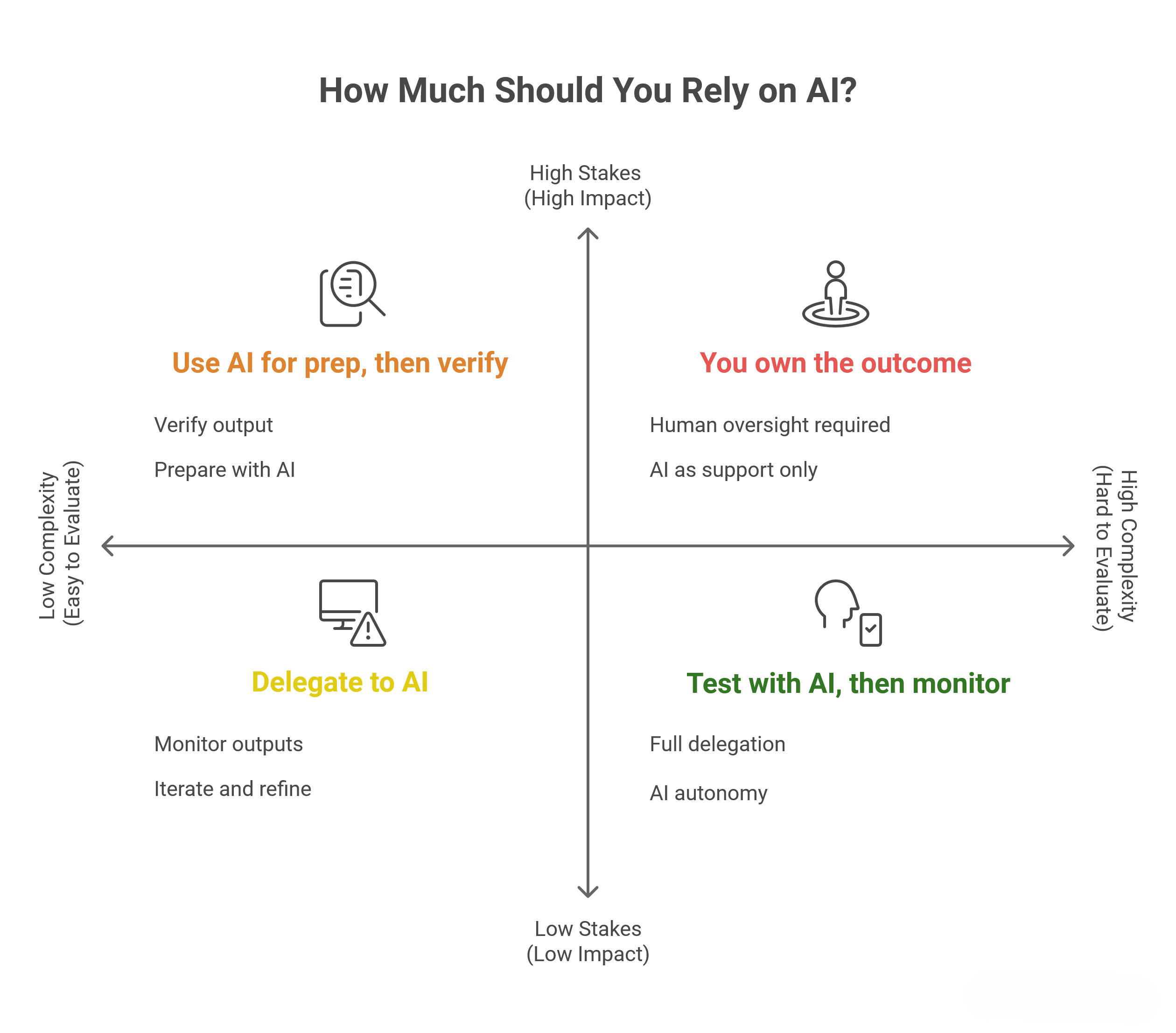
- How repetitive is this? (Highly repetitive → better for AI)
- How high-stakes is the outcome? (Higher stakes → more human control)
- Does it rely on personal judgment, relationships, or ethics? (If yes → human-led, AI can support)
- Would I happily give this to a new intern? (If yes → good candidate for AI)
- Does this task grow my skills or unique value? (If yes → don’t fully replace it)
Here is a Decision Matrix you can follow:
Common Mistakes to Mention
These are some ways and methods that have helped me over time. I’ve also made quite a few mistakes while figuring out how to use AI properly.
- Don’t overuse AI where it’s not needed. It can actually make simple tasks more complicated.
- Don’t expect AI to be perfect. It’s not a Q&A tool — it’s trying to give the closest possible response based on your input. Always review and catch gaps.
- AI is only as good as your instructions. Clear prompts lead to better results.
- Automating repetitive tasks is useful. But trying to automate everything can create problems you didn’t expect.
- “Too much of anything is dangerous.” The same applies to AI tools. Using too many tools can lead to confusion. It’s better to pick a few and get really good at using them.
These are just my personal experiences. I’m not trying to be an advice guru.
AI is still evolving, and even now I come across new things every day. It can get overwhelming to keep track of everything. So for now, I stick to 2–3 tools, use them well, and explore slowly without burning myself out.
If anything, AI has helped me get some time back for myself, and that’s what matters.
