


I always used to wonder, why do I even need other tools when I can do almost everything with ChatGPT, Gemini, Claude, or Perplexity?
I could write emails, create blog content, summarize long articles, go through research papers, even do keyword research, all by just having a conversation. One tool, so many tasks.
But after using AI tools every day, I started to realize something.
Maybe one tool isn’t the best solution for everything.
When separate tools are better
Over time, I started noticing that separate tools actually work better for certain tasks.
- Precision and deeper functionality
When a tool is built to solve just one problem, it tends to go deeper. The features are more focused and actually designed to handle that specific task well. - Better fit for specific tasks
Every task requires a different kind of thinking. Writing, planning, researching, they all need a different mental state. Dedicated tools help you stay focused on just that one thing. - Easier to swap
If a tool is only handling one specific function, it’s easier to replace when needed. You’re not dependent on one tool for everything.
When all-in-one tools are better
At the same time, I also realized that all-in-one tools have their own advantages.
- Reduced cognitive load
Using a single platform makes things simpler. You don’t have to switch between tools or remember where to do what. Everything is in one place. - Lower cost
Bundled tools are often more affordable, especially if you’re working alone or in a small team. You get multiple features without paying for separate tools.
How to choose for yourself
- Go for separate tools when you need precision and deeper functionality. They work better for specific, high-focus tasks.
- Use all-in-one tools when you want simplicity, faster setup, and lower cost, especially for light to medium complexity work.
It’s not always necessary for separate tools to be expensive. So I started looking for tools that could help me with specific tasks I regularly deal with.
I wasn’t looking for just another AI tool, I wanted something simple and actually useful in day-to-day work.
That’s when I came across a tool that I’ve been using for a while now, and it turned out to be a gem.
Goblin Tools
Goblin.tools is a simple AI tool that focuses on one thing, breaking vague, high-level tasks into clear, step-by-step checklists.
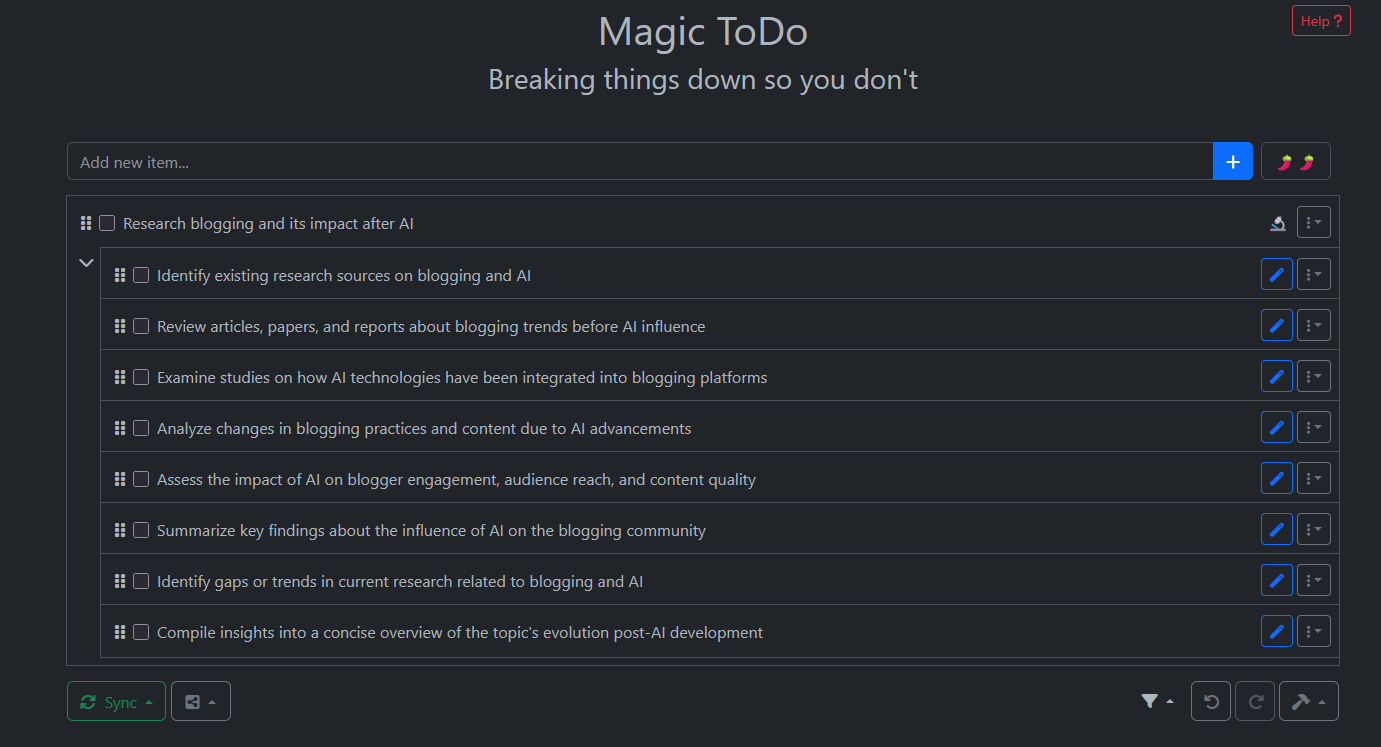
The feature I use the most is Magic To-do.
You can type something like “Research blogging and its impact after AI” or “Learn Spanish in 25 days before travel,” click the “make steps” button, and it gives you a structured checklist of what to do next.
It’s surprisingly simple, but very useful when you don’t know where to start.
How I use it as a blogger
I use it as a quick kick-starter for tasks I want to work on.
There have been times when I get stuck just prompting AI tools, trying to find the “best” plan. I keep going in circles, refining again and again. I’ve spoken about this in detail here: The Hidden Problem With AI: You Keep Refining Instead of Finishing.
This is where Goblin Tools helps me. It gives me a starting point, something I can actually begin with.
Yes, the output can be a bit high-level, but that’s okay. I use it as a base and then improve it as I move forward.
What worked really well
- No more blank screen
As a blogger, not knowing where to start is a real challenge. I’ve had days where I just stared at the screen, unable to begin. Goblin Tools removes that friction by giving me clear tasks to start with, instead of pulling me into endless chats. - No over-engineering
It’s minimal. I create a checklist, paste it into Notion or any document, and move on. Goblin acts as a guide, not another system I need to manage. - Low-friction prompts
I don’t have to craft detailed prompts. I just dump the idea, and it gives me a checklist to start with. This is especially useful when I’m tired or low on energy.
What didn’t work for me
- Feels generic at times
Since it provides high-level checklists, the output can feel a bit general. Unlike chat-based AI tools, you can’t refine or prompt further to make it more specific. - Not flexible for long-term projects
Goblin Tools works well for quick tasks, but not for ongoing or long-term planning. You can’t really manage a monthly project with it — there’s no tracking for deadlines or recurring tasks.
Why using Goblin Tools is better than usual ChatGPT/Claude
ChatGPT and Claude can feel overwhelming when you just want to get started quickly. Yes, you can try to control the prompt, but you often end up overthinking and trying to build the “perfect” plan. And it rarely stops with just one prompt.
- You can ask them to break tasks down, but the response usually comes as a big block of text.
- You still end up copy-pasting, adding bullet points, and reorganizing everything manually.
Goblin Tools, on the other hand, is built for one thing, turning messy ideas into a checklist.
- The UI is task-first. You focus on the task, not crafting the perfect prompt.
- It gives you a clean list that’s ready to use immediately.
As a blogger, this is how I use both:
- Goblin: “Here’s how I start this blog or idea.”
- ChatGPT: “Now help me write and expand this into a full post.”
Should you use it?
I use it when I hit a decision block or brain fog. I just add a sentence, and it gives me that small push to start somewhere.
If you find yourself stuck in a similar way, I’d suggest giving Goblin Tools a try to get started quickly.
The most powerful tools are not always the most advanced ones. They’re the ones you actually use every day.
So choose tools that help you move forward, not ones that keep you stuck prompting again and again.
